Flowise vs Vertex AI Agents vs AutoGPT: Which Is Best for AI Pair Programming in 2026?Updated: October 11, 2026
Flowise vs Vertex AI Agents vs AutoGPT for AI pair programming: compare workflow design, pricing, scale, and fit for teams. Discover
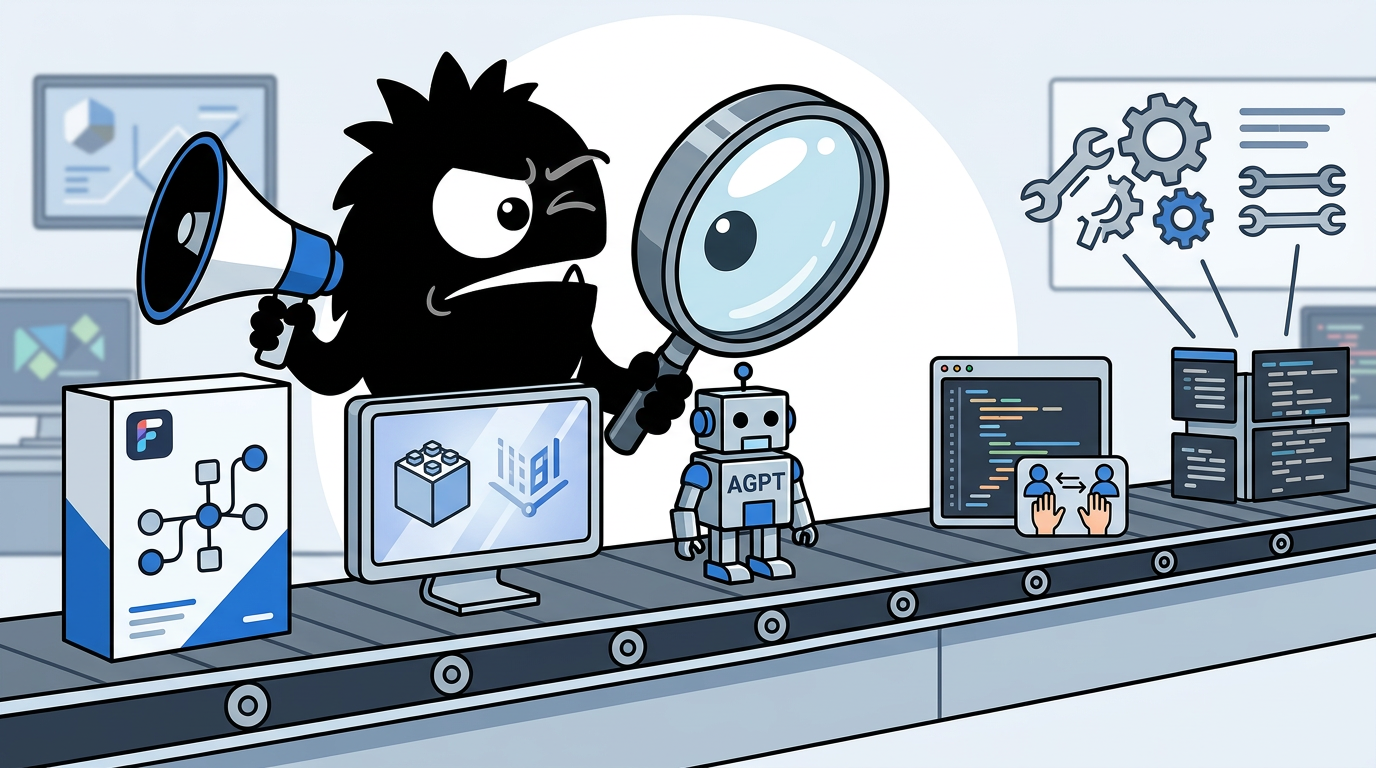
Why AI Pair Programming Now Looks More Like Agent Orchestration Than Autocomplete
If your mental model of AI pair programming is still “Copilot, but better,” you’re already behind the way practitioners are actually working in 2026.
Modern AI pair programming increasingly means handing an agent system a scoped engineering objective, letting it inspect a repo, pull context from docs, call tools, write code, run tests, review diffs, and iterate until a gate is passed. The interesting question is no longer can an LLM write code? It’s whether you can structure the work so the model behaves like part of an engineering system instead of a stochastic autocomplete engine.
🚀 Claude Code Architecture — A Masterclass in AI Agent Design
Every modern AI coding agent isn't just an LLM. It's an ecosystem.
🔹 Input Layer → Understands the request
🔹 Knowledge Layer → Skills + Memory + Context
🔹 Integration Layer → MCP + External Tools
🔹 Execution Layer → Parallel Tool Calling
🔹 Multi-Agent Layer → Specialized Sub-agents
🔹 Output Layer → Verified Results
The real magic is the Master Agent Loop:
Perception → Action → Observation → Repeat
This is how AI evolves from a chatbot into an autonomous engineering system.
The future of software development belongs to AI agents, not just AI assistants. 🔥
#ClaudeCode #AIAgents #GenerativeAI #LLM #Coding #MCP #SoftwareEngineering #ArtificialIntelligence #Tech #Automation
That framing matters because Flowise, Vertex AI Agents, and AutoGPT are not just “three AI coding tools.” They represent three distinct answers to the orchestration problem:
- Flowise: visually compose agentic workflows and tool chains with minimal code.[1][2]
- Vertex AI Agent Builder / Gemini Enterprise Agent Platform: deploy governed, managed agent systems inside Google Cloud.[7][8]
- AutoGPT: build toward more autonomous, task-executing agents through an open platform approach.[13][14]
The shift from a single loop to orchestrated systems is exactly what developers are describing in the wild.
a single coding loop works well for bounded tasks. for building a full product, it is not enough on its own.
i kept the loop inside each task and built a DAG (Directed Acyclic Graph) on top of it:
parallel implementation → independent review → integration gate → checkpoint → next layer
the result is a coding agent team designed to work for 10+ hours without me sitting inside every step.
i wrote down the full system: implementation planning, worktrees, model routing, review gates, shared state, and escalation rules.
Move from vibe coding to Agentic coding.
This instruction will allow anyone to crease commercial ready code. This replaces a team of 5 people, if done right.
1. Get an IDE
2. Install git
3. Write a very detailed spec of what you want (text file). Tell it you want to use (eg) AWS, dynamo for database, lambda for API, cognito for login and use terrafrom for all infra changes
4. give it to your AI and tell it to create MD file, ask you lots of questions and don't make assumptions
5. Once completed, tell it to break it down into tranches, at least 16 to 20
6. Once done, open a new chat and say "use loops, multiple agents and work trees to build xxxx.md, don't stop, don't ask questions". Make sure youre in Agentic/auto approve mode
7. Come back after an hour or so, then test
Then just test, create your next spec (e.g. bug fix tranche1.md", and rorest the whole thing.
Pro tip, give agent Cli access to aws so it can configure everything for you too.
So the decision here is not “which tool writes the best code?” It’s: which platform best fits the kind of AI software engineer you’re trying to build?
Three Different Philosophies: Visual Workflow Builder, Managed Enterprise Agent Stack, and Open Agent Platform
Before comparing features, get the philosophies straight.
Flowise is fundamentally a visual builder. Its core appeal is that you can assemble chatflows, agentflows, tools, memory, and retrieval pipelines through a drag-and-drop interface, then expose them via APIs or self-host them as part of a larger stack.[1][2][3] This is why it keeps showing up in conversations about fast prototyping and internal AI tooling.
4
AI agents & workflow builders (advanced automation)
These help you build systems that “think + act.”
LangChain – build AI apps and agents
LangGraph – advanced multi-step AI agents
AutoGPT – autonomous AI task execution
CrewAI – multi-agent systems (teams of AI bots)
Flowise
Vertex AI Agents — now folded into Google’s broader enterprise agent platform messaging — starts from the opposite end. It assumes that many teams don’t want to own agent infrastructure from scratch. They want managed deployment, identity and access patterns, observability, integrations, and enterprise controls, all inside an existing cloud operating model.[7][8][9] It is less about “hack together a flow tonight” and more about “run this in a real organization without creating a governance incident.”
AutoGPT has had the most perception lag. Many still associate it with the early autonomous-agent hype cycle. But the current platform pitch is more practical: accessible agents you can use and build on, including a platform model rather than just a viral repo.[13][14] On X, that evolution is being noticed.
Self-hosted AI agent platforms - who's winning:
• Dify (75K+ ⭐) - chatbots and much more, mature, feature-rich
• LangGraph - event-driven, production-ready
• AutoGPT - rebuilt as proper agentic platform w/ visual builder
• Flowise - drag-and-drop, fast to prototype
• n8n - automation + AI in one
• Hermes Agent - best for agentic workflows
Pick based on your needs, start building.
And in the broader taxonomy of agent frameworks, people still group Flowise and AutoGPT together — but for very different reasons. Flowise is praised for visual speed; AutoGPT for autonomy and open-ended agent behavior.
AI Agent Frameworks
→ LangChain
→ LangGraph
→ AutoGPT
→ BabyAGI
→ CrewAI
→ OpenAI Agents SDK
→ Semantic Kernel
→ Haystack
→ SuperAGI
→ AgentGPT
→ MetaGPT
→ Flowise
→ Marvin (Prefect)
→ Griptape
→ TaskWeaver (Microsoft)
That difference is the whole comparison. One helps you shape workflows quickly. One helps you operate agent systems safely at scale. One is more about open agent execution and experimentation.
Which Tool Gets You to a Working Coding Workflow Fastest?
If your goal is to stand up an internal coding assistant this week — one that can read docs, inspect a repo, call a few tools, maybe generate tests and answer architecture questions — Flowise is usually the fastest path.
That’s not because visual builders are magically superior. It’s because for common pair-programming patterns — RAG over codebase docs, prompt chains, tool calling, memory, branching logic — the overhead of wiring everything manually is often wasted motion early on. Flowise gives you those building blocks in a composable UI and supports a wide set of models and integrations.[1][3]
You don't need to write a single line of code to build a full AI agent with RAG, memory, and tool calling in 2026.
I know that sounds like a lie. But It's not.
Flowise is an open source drag and drop builder for LLM apps and it's the most slept-on AI tool I've seen this year.
What you can build without touching a single line of code:
→ AI chatbots trained on your own documents
→ RAG pipelines connected to any vector database
→ Agents with persistent memory across sessions
→ Multi-agent workflows that chain tools together
→ Full LLM apps connected to your APIs and databases
Supports literally everything - Claude, GPT, Gemini, DeepSeek, Mistral, Llama, and every local model worth running through Ollama.
Self-hosted. Your data stays on your server.
No vendor lock-in. No monthly SaaS bill.
The no-code AI agent builder the big labs don't want you to know about because it makes their expensive APIs feel optional.
49K+ stars and most people in this space still haven't heard of it.
Now you have.
100% Open Source.
(Link in the comments)
The no-code claim is a little overstated if you need serious engineering workflows, but the underlying point is right: for first versions, Flowise dramatically cuts setup friction. A solo founder or small devtools team can test whether a coding workflow is useful before investing in custom orchestration.
It also fits the way many builders are already operating: quick flow editing, per-step configuration, lightweight branching, save/load iteration.
Finished vibe-coding an internal AI Agents Flow Editor.
No Figma. No roadmap. Just prompt → code → ship.
Built with React Flow, drag, drop, and assign GPT/Claude per step.
✅ Features completed:
- Nodes: Prompt / Tool / Branch / Memory / Output
- Per-step config: model version, temperature, max tokens, system prompt, I/O mapping
- Add / delete / duplicate steps, connect edges, validate cycles
- Save / Load flows as JSON, import / export
-Sidebar for step props · Toolbar: New · Save · Run · Zoom
- OpenAI key integration
Currently juggling 2–3 projects, so I’m sharpening my vibe-coding skills fast.
Big thanks to @rocketdotnew for sponsoring a ton of tokens to bring this to life. 🚀
Vertex AI Agent Builder can also get you moving quickly, especially if your team already lives in Google Cloud. Google has pushed a no-code and low-code experience for building generative AI agents, with connectors and managed deployment paths.[8][10][11] But “fast” here comes with a qualifier: it’s fast inside a cloud platform mindset. If you need IAM alignment, project setup, service configuration, and enterprise review anyway, Vertex may actually be the fastest route to something your org can approve. If you just want to experiment tonight, it probably isn’t.
AutoGPT sits in a more ambiguous middle. It appeals to builders who want agent behavior, not just workflow plumbing. That can be powerful for coding tasks that are naturally goal-oriented: “analyze this module,” “propose a refactor plan,” “implement and validate migration steps.” But depending on the exact platform setup, it may feel more opinionated and less instantly legible than a visual DAG builder.[13][14]
There’s also a practical workflow truth that many teams quietly adopt: prototype the interaction in one place, then move the work into a more agentic environment later.
here’s the exact process i’m using right now:
1. prototype ideas in @GoogleAIStudio. gemini 3 gives you unreal frontend out of the box.
2. use @ChatGPTapp to write solid prompts for literally everything.
3. download the zip from google ai studio and load it into @antigravity, @opencode, @claudeai code, or codex.
4. use @WisprFlow or @WillowVoiceAI to give instructions to all these coding agents.
5. pull missing skills from @vercel’s skill directory instead of learning everything yourself.
6. for any co-build, use @meetgranola. paste transcripts, build from there.
i built https://t.co/2QIhnoygbZ using this exact stack. my own ai tool for writing bangers on x.
best overall process + toolstack i’ve found so far.
Best for fastest prototype: Flowise
Best for fast org-approved deployment: Vertex AI Agents
Best for fast autonomous-task experimentation: AutoGPT
Single Agent or Software Factory? How Each Platform Handles Multi-Agent Coding
This is where the comparison gets real.
A single coding loop is one agent iterating through perceive → plan → act → observe. That works well for bounded tasks: write a function, patch a bug, explain a stack trace. But for larger software work, you start wanting decomposition:
- Planner breaks down the task
- Implementer agents work in parallel
- Reviewer agents check correctness or style
- Integrator agent merges or escalates conflicts
- Test runner validates the outcome
That architecture is not theoretical anymore. It is now normal to hear people discuss “AI software factories” and large specialized sub-agent teams.
THIS ISN'T CLAUDE CODE.
IT'S A 50-AGENT AI SOFTWARE FACTORY.
• Launches up to 50 Claude Code agents to debug, refactor, review, and ship code in parallel
• Smart lock-based coordination prevents agents from conflicting with each other
• Live monitoring, heartbeat tracking, and auto-recovery keep every agent productive
• Supports 34+ development stacks, from Python and Next.js to Rust, Go, Flutter, and more
One command.
An entire AI engineering team.
Repo👇
THIS REPO TURNS CLAUDE CODE INTO A 154-AGENT DEV TEAM
Adds specialized agents for frontend, backend, DevOps, security, and research
Repo: https://github.com/VoltAgent/awesome-claude-code-subagents
And experts are rightly pushing pattern literacy over raw model worship.
AI agents. Agentic AI. Agentic workflows. Agentic patterns. Agents are everywhere. But what exactly are they, and how do we build robust and effective AI applications? Excited to share “Zero to One: Learning Agentic Patterns” a guide to learn common workflow and agentic design patterns with code snippets for @GoogleDeepMind Gemini.
TL;DR:
🔗 Prompt Chaining: Sequentially link LLM calls, where the output of one feeds the input of the next.
👉 Routing: Use LLM to classify input and direct it to the most suitable specialized task, LLM, or tool.
⏸️ Parallelization: Run multiple independent subtasks simultaneously, aggregating results for speed or enhanced quality.
🤔 Reflection: Implement self-correction where an agent evaluates its own output against criteria and iteratively refines it based on feedback.
🛠️ Tool Use (Function Calling): Enable LLMs to interact with the outside world by calling external functions or APIs to fetch data or perform actions.
🗺️ Planning: Have a central LLM dynamically break down a complex goal into a multi-step plan, delegating execution to worker agents (often using tools).
🤝 Multi-Agent: Employ multiple distinct agents, each with specific roles or expertise, to collaborate (often via a coordinator or handoff) on a common goal.
Remember! Start simple! Use workflows for well-defined tasks. Opt for agents when needing adaptability for dynamic problems, but mind the costs/latency and implement robust tracing and error handling.
Flowise: strong for visible workflow decomposition
Flowise’s strength here is that you can see the system. For teams learning agentic design, that matters. Branches, tool calls, retrieval steps, model routing, and chained stages are easier to reason about when represented visually.[1][2] If you want to model “planner → coder → reviewer → test summarizer,” Flowise is one of the most approachable ways to do it.
That said, visual systems can become messy if you try to represent a truly large software factory with many dynamic branches, shared state rules, and long-running coordination. Flowise can model multi-agent logic, but at some point the diagram becomes a liability unless you impose strong conventions.
Vertex AI Agents: best for orchestrated systems with production constraints
Vertex AI Agent Builder is better suited when multi-agent coding is not just a clever demo but a production service. Google’s platform messaging increasingly emphasizes scaling, orchestration options, and deployment support around agent applications.[8][9] If you need governed execution, managed backends, integration into enterprise data and cloud services, and a path to operating agent systems across teams, Vertex has the strongest story.
It is less charming than Flowise and less open-ended than AutoGPT. But for a platform team asked to support “code assistant for 500 engineers with auditing and access control,” that tradeoff is exactly the point.
AutoGPT: more native fit for autonomous execution
AutoGPT remains conceptually closest to the “give the system a goal and let it work” camp. That makes it attractive for coding tasks that are multi-step but not fully deterministic: codebase exploration, migration assistance, iterative implementation, or autonomous task queues.[13][14]
Its strength is not polished enterprise workflow modeling. Its strength is that the agentic behavior is the product, not an add-on. If your pair programmer should feel more like a junior engineer that can take a ticket and run, AutoGPT is philosophically aligned with that use case.
The catch: more autonomy means stronger requirements for guardrails, review gates, and state management. The practitioners getting the best results are not just unleashing one giant model loop; they’re building DAGs, checkpoints, worktrees, and escalation rules. That’s the real lesson behind posts like
a single coding loop works well for bounded tasks. for building a full product, it is not enough on its own.
i kept the loop inside each task and built a DAG (Directed Acyclic Graph) on top of it:
parallel implementation → independent review → integration gate → checkpoint → next layer
the result is a coding agent team designed to work for 10+ hours without me sitting inside every step.
i wrote down the full system: implementation planning, worktrees, model routing, review gates, shared state, and escalation rules.
How Much Real Developer Control Do You Get?
This is the fault line underneath the whole category: low-code convenience versus engineering-grade control.
Flowise gets more respect from developers than most visual tools because it doesn’t stop at the canvas. It exposes APIs, supports self-hosting, and is open source, so teams can integrate it into broader engineering workflows instead of treating it like a toy.[1][3] That’s exactly why people are shipping coding-agent skills around it.
Just shipped flowise-api skill
Manage Flowise AI from any coding agent
- Chatflows, agentflows, assistants CRUD
- Streaming + file uploads
- Document store + vector search
- 11 scripts, zero deps
npx skills add crottolo/flowise-skill
#AI #AgentSkills #Flowise #OpenSource
For many internal pair-programming use cases, that combination is enough:
- visual assembly for fast iteration
- API access for automation
- open-source codebase for customization
- self-hosting for data control
But visual builders do break down. Once your workflow depends on custom state semantics, repo-specific abstractions, deeply typed interfaces, or elaborate approval logic, the diagram stops being the source of truth. The real system moves back into code.
That skepticism is healthy. Developers don’t want “no-code fluff.” They want maintainable systems.
What if building AI agents felt like real engineering instead of no-code fluff?
Meet VoltAgent, a TypeScript-first framework for developers who want:
- Full control
- Modular design
- Multi-agent logic
- Voice, memory, and RAG capabilities
Skip the boilerplate. Build smarter.
Vertex AI gives a different kind of control: less raw freedom, more platform discipline. You are operating within Google Cloud patterns, managed services, and supported integration models.[7][9] If your team values portability above all, that’s a constraint. If your team values standardized ops and fewer infrastructure decisions, that’s a feature.
AutoGPT gives you the most open-ended agent behavior of the three, but that freedom comes with the most responsibility. You need engineering discipline around prompts, tools, repos, schemas, and agent roles or the system will sprawl. Good agent platforms do not eliminate software architecture; they amplify its importance.
How I structure my AI Agent codebase
Building AI Agents is simple, especially with frameworks like @crewAIInc.
But when your codebase starts to become large with multiple agents and hugeass prompts, It is good to follow some good practices.
Keep in mind that these rules are framework agnostic.
Simple rules which I follow:
-Keep it simple and stupid.
-Easy for future changes
-Centralized, Structural, Atomic
An AI Agent System codebase contains some components (As discussed in the previous post, adding on to it):
-Agents
A folder named "agents" where I define all the AI Agents. I write each agent in one file, keeping it clean.
-Tools
All of my custom tools go here. Each tool is written in one file. I have already written a small post on tools. Please feel free to check them out.
-Centralized Prompts
I like to store all the prompts in a separate prompt folder. This makes sure that I can come and change whenever needed. Also allowing my team to look into prompts and suggest changes when needed.
I store prompts in a yaml file. There is no big reason behind it, its simply works for me so I play along.
-Structured Output
I like storing outputs in a folder dedicated to folder only for output schemas of agents. Each file would be a mirror of agents folder. Instead of code for defining agents and tasks, we would define pydantic model
-A driver code
To bring all of this together - https://t.co/w4KXKIUNhq which is where I define the structure of how multiple agents interact.
This is a neat and clean way of dividing the codebase into different components, each with a given responsibility. Like I said, this is my way of doing.
Surely it might not be the best for you, but in general, this is a good starting point for you.
As time may pass, you might figure out some issues, you might come up with a fix. Please do reach out to me and point it out. It would help me in learning.
One blunt rule: if your AI pair programming workflow needs to become a long-lived engineering product, treat prompts, tools, output schemas, and routing logic like code, regardless of platform.
Security, Governance, and Production Readiness: Where the Real Gaps Show Up
Most AI pair-programming demos skip the hard parts:
- how secrets are handled
- who can invoke which tools
- whether logs leak credentials
- how execution is traced
- whether streaming is stable under load
- what happens when an agent takes the wrong action
Those are not edge concerns anymore. They are the real maturity markers.
Agent protocol hygiene is improving across the stack. `OpenHands` merged log redaction for sensitive keys, while `FlowiseAI/Flowise` fixed MCP PKCE auth issues. With `BerriAI` and `AutoGPT` also pushing streaming fixes, secure agent comms are becoming the default.
View on XFor Flowise, the good news is that its ecosystem has clearly been hardening, and the open-source pace has helped it close gaps quickly.[2] But if you self-host it, you own much more of the operational envelope: deployment posture, secret management, network boundaries, audit trails, backup, versioning, and incident response. That is fine for startups and capable infra teams. It is less fine for organizations that want a vendor-managed control plane.
For Vertex AI Agents, security and governance are the strongest argument. Google’s enterprise agent positioning is explicitly about managed platforms for production AI deployment, with the surrounding cloud controls, operational tooling, and scale characteristics enterprises expect.[7][9][12] You pay for that in complexity and lock-in, but if compliance, auditability, and centralized governance matter, Vertex is the most credible option here.
For AutoGPT, you should ignore both the old hype and the old backlash and judge the current platform on present capabilities. The right questions are operational:
- How are long-running tasks managed?
- How stable is streaming?
- What review or human-in-the-loop controls exist?
- How easy is it to constrain tool access?
- How observable is the agent at runtime?
That’s why this category’s discourse is shifting toward protocol hygiene, streaming reliability, and hardened execution rather than just “autonomy.” And it’s why practical team patterns increasingly split work so that the agent explores and implements, while a human approves the surviving path.
The split that made it work: the agent does the survey, the characterization tests and the 200-call-site migration. I make one decision, which implementation survives. The full playbook, with the Claude Code skill that runs it:
https://tim-schipper.nl/en/blog/cleaning-up-ai-generated-code
Pricing, Learning Curve, and Total Cost of Ownership
The cheapest tool is usually not the one with the lowest sticker price. It’s the one whose setup, maintenance, and failure modes match your team.
Flowise often has the lowest barrier to experimentation because it is open source and self-hostable.[2] You can get started without a platform procurement process, and for smaller internal tools that matters a lot. But “free” quickly becomes “somebody owns the box.” Infrastructure, upgrades, security patches, model serving choices, and operational debugging are still costs.
Vertex AI Agents shifts that burden onto Google Cloud — and bills accordingly.[7][10][11] The upside is reduced platform engineering overhead. The downside is cloud consumption cost, vendor dependence, and the risk that a cheap prototype becomes an expensive production service if you don’t manage usage tightly.
AutoGPT lands somewhere in the middle. The software may be open and flexible, but the real cost depends on how agentic you want the system to be. Autonomous workflows can burn tokens, trigger many tool calls, and require more runtime supervision than a simpler chained workflow.[13][14]
Building diy personal ai - study list
Ollama, LM Studio, GPT4All, Jan, LangChain, LlamaIndex,AutoGPT,
Retrieval Augmented Generation (RAG),
Flowise, n8n
Full diy ai from scratch
Gather data, create neural network, train the model. Use LoRA (Low-Rank Adaptation) to fine-tune
Learning curve also differs by audience:
- Non-coders / operators: Flowise is easiest to understand.
- Application developers: Flowise is approachable; AutoGPT is more agent-native; Vertex requires more cloud context.
- Platform teams / enterprise architects: Vertex is easiest to justify operationally, even if it’s not the easiest to love.
And one subtle but important cost point: teams often overpay for models because they underinvest in workflow structure. Prompt discipline, project context, and explicit architecture usually matter more than switching from one frontier model to another.
Usually use #Claude and #Cursor at ~10% of their real power 🤖
The problem isn’t the model. It’s how we talk to it - and how we structure our projects.
Here’s the practical playbook I actually use to build faster and break less.
1. The 6-Element Prompt Framework
To get precise results instead of generic slop, every strong prompt needs:
Role - Who the AI should act as
Context - Why this matters and who it’s for
Task - Clear action
Constraints - What not to do
Examples - Show the desired style/output
Format - How you want the answer structured
Add “Let’s think step-by-step” at the end for complex tasks (Chain-of-Thought)
2. Stop vibe-coding without structure
Vibe-coded apps usually break by day 3 because context rots and the $AI loses track of dependencies. The fix: Create an AI_docs/ folder in your repo with a clear project map. Instead of feeding the entire codebase, give the AI a structured reference:
- tech_stack.md
- database.md
- features/auth.md
- roadmap.md
This dramatically reduces hallucinations and broken features.
3. Claude Workflow Tips That Actually Matter
1. Edit previous messages instead of starting new ones
2. Start fresh chats when switching tasks
3. Use Projects for persistent workspaces
4. Create Skills for repeatable tasks (e.g. /write-hook)
5. Write tests as you build - they act as a safety net
Which part are you planning to implement first - better prompting, setting up AI_docs/, or creating custom Skills in @claudeai ?
Who Should Use Flowise, Vertex AI Agents, or AutoGPT for AI Pair Programming?
If you strip away marketing, the answer is pretty clear.
Choose Flowise if you want speed, visibility, and open-source control
Flowise is the best fit for:
- solo builders and startups
- internal coding assistants
- repo Q&A, RAG, memory, and tool-calling workflows
- teams that want to prototype fast, then extend via API
- orgs that prefer self-hosting and avoid immediate cloud lock-in
It is the most practical choice when you need to discover the workflow before industrializing it.[1][2]
Choose Vertex AI Agents if you need enterprise-grade deployment
Vertex is best for:
- larger engineering orgs
- regulated or security-sensitive environments
- teams already invested in Google Cloud
- platform groups building governed coding assistants for many users
- use cases where observability, IAM alignment, and managed operations matter more than hacker speed
It is the best option when the hard part is not building the agent, but running it safely and repeatedly at scale.[7][8][12]
Choose AutoGPT if you want more autonomous coding-task execution
AutoGPT is best for:
- experimentation-heavy builders
- agent-first product teams
- workflows that feel like goal-driven task execution, not just flow composition
- teams comfortable adding their own review gates and constraints
- developers who want an open platform with stronger autonomy roots
It is the best fit when your pair programmer should behave less like a chain of prompts and more like a ticket-taking agentic worker.[13][14]
Quick decision matrix
| Team / Need | Best Choice | Why |
|---|---|---|
| Solo dev building internal coding helper | Flowise | Fastest path, visual iteration, low initial overhead |
| Startup prototyping agentic devtools | Flowise or AutoGPT | Flowise for workflow clarity; AutoGPT for autonomous task behavior |
| Enterprise platform team | Vertex AI Agents | Governance, scale, managed runtime |
| Security-sensitive org | Vertex AI Agents | Strongest production controls |
| Self-hosting, open-source preference | Flowise | Most direct fit |
| Goal-driven autonomous coding experiments | AutoGPT | Most aligned with agentic execution model |
| Hybrid human-review coding pipeline | Flowise or Vertex | Flowise for design speed; Vertex for production operations |
Bottom line:
- Best overall for most teams starting AI pair programming: Flowise
- Best for enterprise production deployment: Vertex AI Agents
- Best for open-ended autonomous coding experiments: AutoGPT
The bigger lesson from the X conversation is that model quality alone is no longer the differentiator. Workflow architecture, review gates, tool integration, context management, and operational discipline are what separate a flashy demo from a useful AI pair programmer.
Sources
[1] Flowise documentation — https://docs.flowiseai.com/
[2] Flowise - Build AI Agents, Visually — https://flowiseai.com/
[3] FlowiseAI/Flowise: Build AI Agents, Visually — https://github.com/flowiseai/flowise
[4] How to Build No-Code AI Agents Using Flowise AI — https://www.codecademy.com/article/flowise-ai-tutorial
[5] Flowise AI : Build Powerful AI Agents Visually Without Coding — https://www.seaflux.tech/blogs/flowise-ai-visual-ai-agent-builder/
[6] Code vs. Low-Code with Langchain, n8n, and Flowise — https://medium.com/@jfaa27/your-guide-to-ai-automation-code-vs-low-code-with-langchain-n8n-and-flowise-c6a0f0c0339e
[7] Gemini Enterprise Agent Platform (formerly Vertex AI) — https://cloud.google.com/products/gemini-enterprise-agent-platform
[8] Vertex AI Agent Builder documentation — https://docs.cloud.google.com/agent-builder
[9] More ways to build and scale AI agents with Vertex AI Agent Builder — https://cloud.google.com/blog/products/ai-machine-learning/more-ways-to-build-and-scale-ai-agents-with-vertex-ai-agent-builder
[10] Build generative AI experiences with Vertex AI Agent Builder — https://cloud.google.com/blog/products/ai-machine-learning/build-generative-ai-experiences-with-vertex-ai-agent-builder
[11] Building AI Agents with Vertex AI Agent Builder — https://codelabs.developers.google.com/devsite/codelabs/building-ai-agents-vertexai
[12] Get started with Vertex AI Agent Builder — https://cloud.google.com/blog/products/ai-machine-learning/get-started-with-vertex-ai-agent-builder
[13] AutoGPT — Stop building workflows. Start hiring agents. — https://agpt.co/
[14] What is the AutoGPT Platform? | AutoGPT Platform | AutoGPT — https://agpt.co/docs/platform/
References (15 sources)
- Flowise documentation - docs.flowiseai.com
- Flowise - Build AI Agents, Visually - flowiseai.com
- FlowiseAI/Flowise: Build AI Agents, Visually - github.com
- How to Build No-Code AI Agents Using Flowise AI - codecademy.com
- Flowise AI : Build Powerful AI Agents Visually Without Coding - seaflux.tech
- Code vs. Low-Code with Langchain, n8n, and Flowise - medium.com
- Gemini Enterprise Agent Platform (formerly Vertex AI) - cloud.google.com
- Vertex AI Agent Builder documentation - docs.cloud.google.com
- More ways to build and scale AI agents with Vertex AI Agent Builder - cloud.google.com
- Build generative AI experiences with Vertex AI Agent Builder - cloud.google.com
- Building AI Agents with Vertex AI Agent Builder - codelabs.developers.google.com
- Get started with Vertex AI Agent Builder - cloud.google.com
- GitHub - Significant-Gravitas/AutoGPT: AutoGPT is the vision of accessible AI for everyone, to use and to build on. Our mission is to provide the tools, so that you can focus on what matters. - github.com
- AutoGPT — Stop building workflows. Start hiring agents. - agpt.co
- What is the AutoGPT Platform? | AutoGPT Platform | AutoGPT - agpt.co
Related Guides

The Best AI Bubble Signals in 2026: What Polymarket's 7% Odds Reveal About AI and SaaS
25 min read
What Is Cursor AI? A Complete Guide for 2026
24 min read
The Best AI Model Prediction Market in 2026: What $2.6M in Traders' Odds Reveals About the AI Race
22 min read
AI Safety and Alignment: A Complete Guide for Builders in 2026
19 min read